Running a small business means there’s always something to follow up on. A new lead comes in, a customer asks for pricing, or someone needs a reminder about a proposal you sent last week. These tasks seem small, but together, they take up a lot of time.
That’s what makes AI sales agents interesting to me. Instead of simply generating text, an AI agent can work with your business tools and help handle parts of the sales process, from organizing leads to preparing follow-up messages.
As a developer exploring practical AI automation, I want to understand not just what these agents can do, but how to build an AI sales agent that actually works in a real business.
In this guide, we’ll build that understanding step by step, explore the tools involved, and look at where an AI sales agent can help—and where human judgment still matters.
Table of Contents
What Is an AI Sales Agent?
An AI sales agent is an AI-powered system that can understand sales-related requests, work with connected business tools, and help complete tasks such as qualifying leads, answering customer inquiries, and preparing follow-up messages.
Unlike a basic automation that follows fixed rules, an AI sales agent can use an AI model to interpret information and decide which action to take within the boundaries you define.
For example, imagine someone fills out your website’s contact form asking about your web development services.
An AI sales agent could:
- Review the inquiry and extract the customer’s requirements.
- Check whether the lead matches your business criteria.
- Add the relevant information to your CRM.
- Draft a personalized response based on the customer’s needs.
- Create a follow-up reminder if the customer doesn’t respond.
You can configure the workflow to require your approval before sending messages or making important changes.
The important thing to understand is that an AI sales agent isn’t just a chatbot. It’s a combination of an AI model, business data, connected tools, and workflow rules that help it perform specific sales tasks.
The goal isn’t to replace your entire sales team. It’s to reduce repetitive work so your team can spend more time understanding customer needs and building relationships.
AI Sales Agent vs. Traditional Sales Automation
Traditional sales automation and AI sales agents can both save time, but they work differently.
Traditional automation follows predefined rules. For example, when someone fills out a contact form, it can automatically send a confirmation email and add the lead to your CRM.
An AI sales agent can go a step further by interpreting the inquiry, extracting the customer’s requirements, and preparing a relevant response based on the available information.
Here’s how they compare:
| Feature | Traditional Automation | AI Sales Agent |
|---|---|---|
| How it works | Follows predefined rules | Uses an AI model alongside rules and connected tools |
| Lead handling | Routes leads based on fixed conditions | Can interpret lead details and assess them against defined criteria |
| Customer messages | Sends predefined templates | Can draft context-aware, personalized messages |
| Decision-making | Follows configured conditions | Can interpret information and select from permitted actions |
| Best suited for | Repetitive, predictable tasks | Tasks involving variable information and language |
| Reliability | Usually predictable when rules and inputs are consistent | Can produce incorrect or inconsistent outputs and needs safeguards |
Which One Should You Choose?
You don’t always need an AI sales agent.
If your goal is to send a confirmation email whenever someone submits a form, traditional automation is usually simpler and more reliable.
But if you want to analyze incoming inquiries, summarize customer requirements, or prepare personalized follow-ups, adding an AI model may be useful.
You can also combine both approaches. Use traditional automation for predictable steps and AI for tasks that require interpreting information.
A practical rule: Start with the simplest solution that solves your problem. Add AI only when it provides a clear benefit.
What Can an AI Sales Agent Do?
An AI sales agent can support different parts of the sales process, depending on the tools it can access and the tasks you configure it to handle.
Here are some practical ways a business can use one.
1. Qualify Incoming Leads
When someone submits an inquiry, an AI sales agent can extract details such as their requirements, budget, and expected timeline.
It can compare these details against your qualification criteria and help prioritize which leads need attention first.
For example, a web development agency might prioritize a prospect who has a clear project scope and wants to get started soon.
2. Draft Personalized Sales Messages
Sending the same message to every prospect rarely addresses their specific needs.
An AI sales agent can use information from an inquiry or previous conversation to draft a more relevant response.
For example, if a prospect asks about building an online store, the agent can prepare a reply that addresses product management, payment integration, and delivery requirements.
You can review the message before sending it to the customer.
3. Manage Follow-Ups
A potential customer might receive a proposal but forget to respond. Following up manually with every prospect can become difficult as the business grows.
An AI-powered workflow can identify leads that need attention, prepare follow-up messages, and create reminders based on your chosen schedule.
For instance, if a prospect hasn’t replied to a proposal after three days, the system can prepare a polite follow-up for approval.
4. Update Your CRM
Keeping customer records updated is important, but it can involve a lot of repetitive data entry.
With the right integration, an AI sales agent can summarize conversations, record relevant customer details, update approved fields, and create follow-up tasks in your CRM.
This helps your team spend less time on administrative work.
5. Answer Common Sales Questions
An AI sales agent can help respond to common questions about your services, pricing plans, delivery timelines, and business processes using information from your approved knowledge base.
For example, if a prospect asks whether your agency builds Shopify stores, the agent can check your service information and draft an accurate answer.
For questions involving custom pricing, contractual commitments, or exceptions to your policies, it should escalate the conversation to a human.
Which Task Should You Automate First?
You don’t need to build an agent that handles all five tasks from day one.
Start with a repetitive task that takes up time, has a clear process, and is easy to measure. Lead qualification or follow-up reminders can be good starting points because you can evaluate whether the workflow is saving time and helping your team respond consistently.
Once that workflow is reliable, you can gradually add more capabilities.
The next step is to turn one of these use cases into a working system.
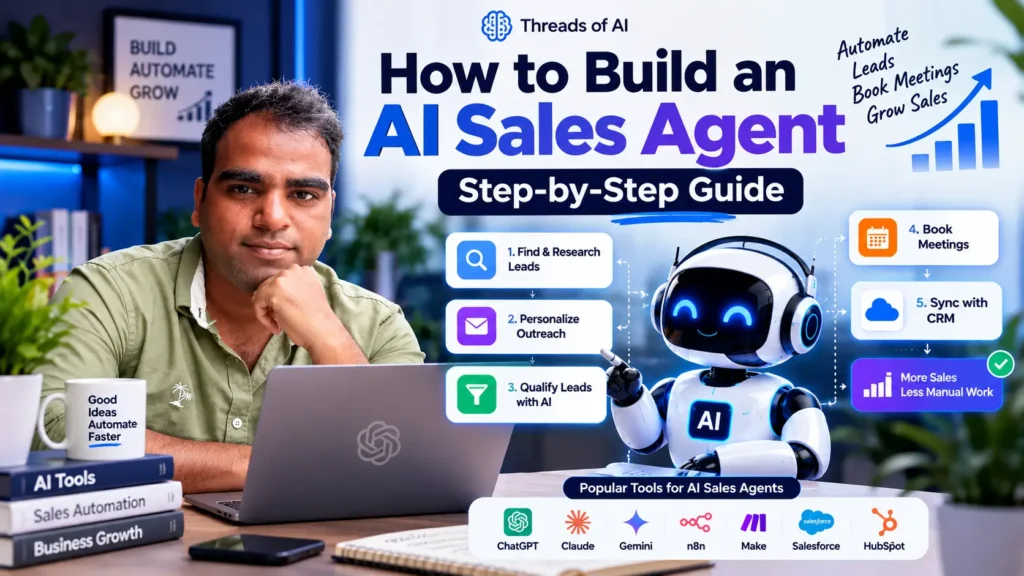
How to Build an AI Sales Agent: 7 Proven Steps
Building an AI sales agent doesn’t mean you need to automate your entire sales process from the beginning. A better approach is to choose one repetitive task, connect the tools you need, and expand the workflow as you learn what works.
For this walkthrough, let’s use a simple example: a web development agency that receives project inquiries through its website and wants to qualify leads and prepare personalized follow-up messages.
We’ll build the process step by step, from defining the goal to testing and deploying the workflow.
Step 1: Define the Goal of Your AI Sales Agent
Before choosing an AI model or connecting tools, decide what you want the agent to accomplish.
A vague goal like “automate sales with AI” makes it difficult to design a useful workflow or measure its results. Start with one specific problem instead.
For our example, the goal is to help the agency review incoming leads, identify their project requirements, and prepare a suitable response for the sales team.
Define three things before moving forward:
- The task: What repetitive sales activity should the agent handle?
- The inputs: What information will it need, such as the customer’s inquiry, budget, project type, and timeline?
- The expected output: What should it produce, such as a structured lead summary, a priority label, and a draft response?
For example, when a prospect submits a website development inquiry, the agent should extract the project details, compare them against the agency’s qualification criteria, and prepare a response for review.
You should also define what the agent must not do. At this stage, it shouldn’t invent missing customer details, promise a price that hasn’t been approved, or send messages without the required authorization.
Practical tip: Write down the current process before automating it. If you can’t explain how a person completes the task today, it will be difficult to build a reliable automated workflow around it.
Once the goal is clear, you can choose the tools and integrations needed to make it work.
Step 2: Choose the Right Tools and AI Model
Once you’ve defined the goal, the next step is choosing the tools that will power your AI sales agent.
You don’t need a complicated tech stack to get started. For a basic lead qualification and follow-up workflow, you need a way to trigger the process, an AI model to interpret the inquiry, and tools to store information and prepare a response.
Here is one practical setup:
| Component | Example Tool | Purpose |
|---|---|---|
| Workflow automation | n8n | Connects the different steps and moves data between them |
| AI model | OpenAI API | Understands the inquiry and generates structured output |
| Lead source | Website contact form | Supplies the prospect’s information |
| CRM or database | HubSpot or Google Sheets | Stores lead details and qualification results |
| Communication | Gmail or another email service | Prepares or sends follow-up messages |
These are examples, not mandatory choices. You can use other tools depending on your budget, existing systems, and technical requirements.
Before choosing your tools, explore our guide to AI automation tools for small businesses.
Why Use n8n?
For this example, n8n can act as the workflow layer connecting your website form, AI model, CRM, and email service.
When a new inquiry arrives, the workflow can pass the relevant details to the AI model, validate its response, save the lead information, and prepare a follow-up message.
You can build this visually using connected nodes instead of writing every integration from scratch. Custom code is still an option when you need more control.
Which AI Model Should You Choose?
An AI model helps interpret customer messages and generate useful outputs. For example, it can turn an unstructured inquiry into a structured record containing the project type, requirements, budget, timeline, and missing information.
Choose a model that meets your needs for accuracy, response speed, structured outputs, and cost. You don’t necessarily need the most powerful or expensive model for a straightforward lead qualification task.
Keep Your First Setup Simple
For your first version, a website form, n8n, an AI model, and Google Sheets may be enough to demonstrate the workflow. You can add a CRM or more advanced integrations when the process becomes reliable.
Before choosing a tool, check its API availability, pricing, data-handling policies, and integration requirements. Never send customer information to an external service without considering your privacy and security obligations.
Practical tip: Choose tools based on the workflow you need to build, not the number of AI tools you can connect. A small, reliable setup is a better starting point than a complicated system that’s difficult to debug.
Step 3: Design the Sales Workflow
Before connecting your tools, map out how information should move through your AI sales agent.
A workflow defines what happens when a new lead arrives, what information the AI should process, where the results should go, and when a human needs to step in.
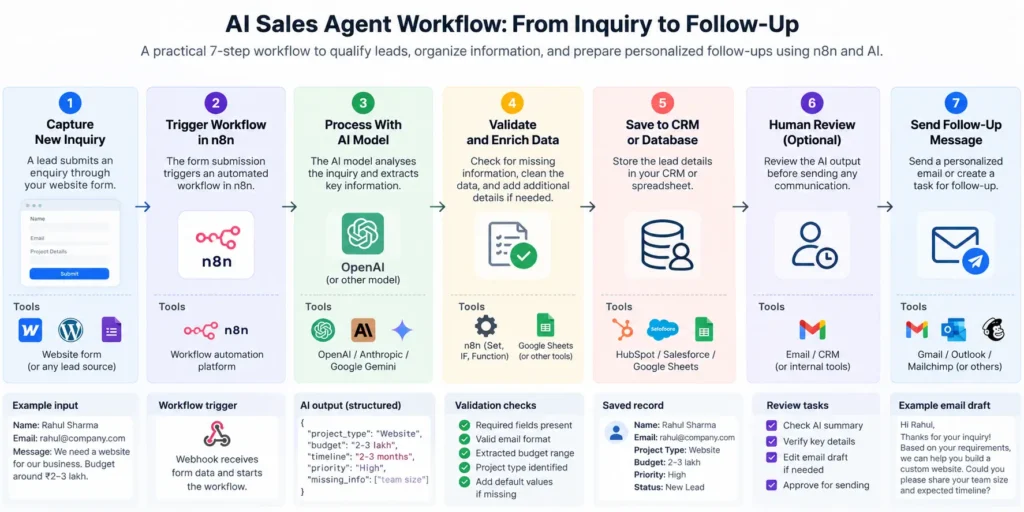
For our web development agency example, the workflow could look like this:
Website Form → n8n → AI Model → Lead Validation → CRM or Google Sheets → Human Review
Here’s how each stage works.
1. Capture the lead
A prospect submits the website contact form with details such as their name, email address, project requirements, and expected timeline. The form triggers the workflow in n8n through a webhook or an available form integration.
2. Prepare the information
The workflow checks that required fields are present and formats the information before sending it to the AI model. This helps avoid processing incomplete or incorrectly formatted submissions.
3. Analyze the inquiry
The AI model extracts the project requirements, identifies missing information, and assesses the lead against criteria defined by the business.
For example, the model might return a structured result containing the project type, timeline, qualification status, and a short explanation.
4. Validate the result
Don’t automatically trust every AI-generated answer. Check that the output follows the expected structure, that the qualification label is valid, and that important fields aren’t fabricated.
If the response is invalid or the inquiry is unclear, route it for human review instead of continuing blindly.
5. Store the lead details
Once validated, the workflow saves the lead information and assessment to Google Sheets or a CRM. It can also create a task for the sales team.
6. Prepare the follow-up
The AI model can draft a personalized response using the customer’s inquiry and approved business information. The draft is then sent to a human for review before delivery.
This gives the team a useful starting point without allowing the agent to make unauthorized promises to prospects.
Define What Happens When Something Goes Wrong
A reliable workflow also needs to handle situations such as missing customer details, API failures, duplicate submissions, and invalid AI responses.
For example, if the AI service is temporarily unavailable, the workflow should record the failure and allow the lead to be processed later rather than silently losing the inquiry.
Practical tip: Draw the workflow before building it. Make sure every step has a clear input, an expected output, and a defined action for failures or uncertain results. This makes the next stage—connecting your tools—much easier.
Step 4: Connect Your Data Sources and Sales Tools
Now that you’ve designed the workflow, it’s time to connect the tools that will make it work.
For our example, we’ll use n8n to connect a website form, an AI model, and Google Sheets. You can replace Google Sheets with a CRM when your business needs a more advanced setup.
1. Connect Your Website Form
Start by creating a trigger in n8n using a Webhook node or a supported form integration.
When a prospect submits the form, it should pass the relevant information to your workflow, such as:
- Name and business email
- Project requirements
- Estimated budget, if provided
- Expected project timeline
Test the trigger with a sample submission and confirm that the information arrives in the correct fields.
2. Connect the AI Model
Next, configure an AI model using a supported integration or API.
Pass the customer’s inquiry along with clear instructions explaining what the model should extract and how it should format the result.
For example, ask it to return the project type, requirements, timeline, missing information, and a suggested lead priority in a defined JSON structure.
Use structured output or schema validation where available. This makes it easier for the workflow to process the response reliably.
3. Connect Google Sheets or Your CRM
Create a destination for storing the lead information and AI-generated assessment.
For a simple prototype, a Google Sheet could contain columns such as:
| Lead | Project Type | Timeline | Priority | Status |
|---|---|---|---|---|
| Sample Lead | E-commerce website | 2 weeks | High | Needs review |
This is illustrative sample data, not a real customer record.
Configure the appropriate integration in n8n to add a new row or update an existing lead. Also consider how you’ll identify duplicate submissions so the same inquiry isn’t accidentally processed multiple times.
4. Connect Your Email Service
Once the lead information has been processed, the workflow can prepare a personalized email draft using approved business information.
For the first version, keep human approval before sending the message. You can add automated sending later after testing the workflow and defining clear limits.
5. Configure Credentials Securely
Most integrations require API keys, OAuth authorization, or other credentials.
Store these using n8n’s credential management rather than hardcoding secrets in prompts, workflow expressions, or source code. Give each integration only the permissions it needs, and avoid sending unnecessary personal information to the AI model.
Practical tip: Connect and test one service at a time. First verify the form trigger, then the AI response, then the spreadsheet update, and finally the email draft. If something fails, this approach makes the problem much easier to isolate.
Step 5: Build and Configure the AI Sales Agent
Now that your tools are connected, you need to define how the AI sales agent should interpret incoming leads and respond to them.
This is where clear instructions matter. The AI model needs to understand its role, the information it can use, the criteria for qualifying leads, and the actions it must avoid.
For our web development agency, the agent will review incoming project inquiries, extract important details, assess the lead against predefined criteria, and draft a relevant follow-up message.
1. Define the Agent’s Role
Start with a clear system instruction that explains the agent’s responsibilities and boundaries.
For example:
You are an AI sales assistant for a web development agency.

Your responsibilities are to:
- Analyze incoming project inquiries.
- Extract the customer's requirements.
- Identify missing information.
- Assess leads using the qualification criteria provided.
- Draft a relevant follow-up message using approved business information.

Rules:
- Never invent customer details, prices, or service offerings.
- If important information is missing, mark it as unknown.
- Explain the reason behind the suggested lead priority.
- Do not send emails or make commitments.
- Flag unclear or unusual inquiries for human review.
This gives the model a defined role rather than asking it to handle sales without clear boundaries.
2. Define the Lead Qualification Criteria
The agent also needs rules for assessing leads. Otherwise, labels such as “high priority” or “low priority” may be inconsistent.
For example, the agency might prioritize prospects who have a clear project requirement, a realistic budget, and a specific timeline.
These criteria should reflect your actual business process. A missing budget alone shouldn’t automatically make a lead low priority if the business regularly works with customers who need an initial consultation.
3. Request Structured Output
Instead of asking the model to return a long paragraph, request a consistent structure that your workflow can process.
For example:
{
  "project_type": "E-commerce website",
  "requirements": [
    "Online payments",
    "Product management"
  ],
  "timeline": "Within one month",
  "budget": "Not provided",
  "lead_priority": "Medium",
  "reason": "The project requirements are clear, but the budget needs confirmation.",
  "missing_information": [
    "Budget range"
  ],
  "follow_up_draft": "Thanks for sharing your project details. Could you tell us your expected budget range so we can recommend a suitable approach?"
}
This is illustrative output. The actual values should come from the customer’s inquiry and your business rules, not assumptions made by the model.
In your n8n workflow, validate the returned data before using it to update a CRM or prepare a message.
4. Give the Agent Access Only to Necessary Tools
An AI model generating a response is not the same as an agent taking action.
To perform actions, the system needs appropriate integrations and permissions. For the first version, allow the workflow to read the inquiry, analyze it, and save the result. Keep email sending and important CRM changes behind a human approval step.
As you gain confidence in the workflow, you can introduce additional actions with clear permissions and safeguards.
Practical tip: Test the agent with different types of inquiries, including incomplete forms, vague requirements, unrealistic budgets, and messages outside your services. A useful agent should recognize uncertainty and ask for clarification rather than confidently inventing an answer.
Step 6: Test Your AI Sales Agent
Before deploying your AI sales agent, test it with different types of inquiries to make sure the workflow behaves as expected.
A successful test isn’t just about whether the AI generates a good response. You also need to verify that the lead information is accurate, the right actions are triggered, and errors are handled safely.
1. Test Different Lead Scenarios
Start by creating sample inquiries that represent situations your business might encounter.
For example:
- Complete inquiry: The prospect provides project requirements, budget, and timeline.
- Incomplete inquiry: The prospect describes the project but doesn’t mention a budget.
- Unclear inquiry: The message doesn’t explain what the customer needs.
- Out-of-scope request: The prospect asks for a service your business doesn’t offer.
- Duplicate inquiry: The same lead submits the form more than once.
Check whether the agent extracts the available information correctly, identifies missing details, and assigns priority according to your defined rules.
It should not invent missing information or treat every inquiry as a qualified sales opportunity.
2. Verify Every Workflow Step
Run each test through the complete workflow and check the results.
Confirm that:
- The website form triggers the workflow correctly.
- The AI returns the expected structured output.
- Invalid or incomplete outputs are handled safely.
- The CRM or spreadsheet receives the correct information.
- The follow-up draft matches the customer’s inquiry.
- No email is sent without the required approval.
Testing the entire workflow matters because a correct AI response can still lead to problems if the data is mapped incorrectly or the wrong action runs afterward.
3. Test Failures and Edge Cases
Real systems encounter problems. An API might become unavailable, a request might time out, or a CRM update might fail.
Decide what should happen in each situation. For example, the workflow could log the error, retry a temporary failure within defined limits, and alert the team if processing still fails.
Also protect against duplicate processing so that retries don’t accidentally create multiple records or send repeated messages.
4. Measure Whether the Agent Actually Helps
Before deployment, record how the current process performs. Then compare it with the AI-assisted workflow.
Useful metrics include:
- Time spent processing each lead.
- Accuracy of extracted lead information.
- Percentage of AI-generated drafts accepted with little or no editing.
- Number of workflow failures.
- Time taken to respond to new inquiries.
These measurements help you decide whether the agent is genuinely useful or simply adding another layer of complexity.
Practical tip: Don’t aim for a workflow that never needs human attention. Aim for one that handles routine cases consistently and recognizes when a person needs to step in.
Step 7: Deploy, Monitor, and Improve Your AI Sales Agent
Once your AI sales agent passes testing, you can introduce it into your actual sales process. But instead of automating everything immediately, start with a controlled rollout.
The goal is to confirm that the workflow continues to perform reliably with real inquiries and changing business needs.
1. Start With a Small Rollout
Begin with one use case, such as qualifying incoming leads and preparing follow-up drafts.
For the first few days or weeks, review the agent’s output before it reaches customers. Check whether it extracts requirements correctly, follows your qualification criteria, and produces useful messages.
This gives you an opportunity to identify problems before expanding the agent’s responsibilities.
2. Keep Human Approval for Important Actions
Not every action needs the same level of supervision.
You might allow the workflow to save lead details automatically while requiring approval before sending a customer email, offering a discount, or making a commitment about project delivery.
As the system demonstrates consistent performance, you can consider automating additional low-risk actions with appropriate safeguards.
3. Monitor Performance Regularly
An AI sales agent needs ongoing monitoring because business processes, customer inquiries, integrations, and AI model behavior can change.
Review metrics such as processing time, lead qualification accuracy, email draft quality, workflow errors, and customer response times.
If the agent repeatedly misclassifies a particular type of inquiry, update your qualification criteria or instructions and test the revised workflow before rolling it out.
4. Improve the Workflow Gradually
Once the initial workflow is stable, you can extend it to support other parts of the sales process.
For example, you might add automatic follow-up reminders, conversation summaries, CRM updates, or routing for inquiries that require specialist attention.
Add one capability at a time and measure its impact. This makes it easier to identify which changes improve the process and which introduce unnecessary complexity.
Practical tip: Deployment isn’t the finish line. A useful AI sales agent is one that continues to save time, produces dependable results, and knows when to hand a task back to a human.
Practical Example: Build an AI Sales Agent Workflow With n8n
Let’s bring everything together with a simple example.
Imagine you run a web development agency and receive project inquiries through your website. You want to reduce the time spent reviewing each inquiry and preparing follow-up emails.
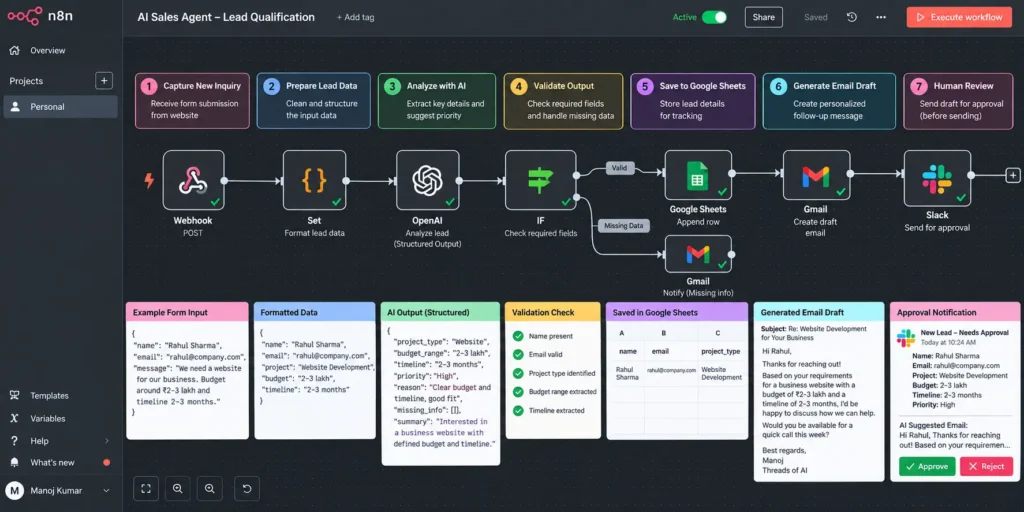
You can use n8n to connect the form, an AI model, Google Sheets, and an email approval process.
How the Workflow Works
Step 1: A lead submits a form
A potential customer fills out your website form with their contact details, project requirements, and expected timeline.
Step 2: n8n receives the inquiry
A Webhook node triggers the workflow and passes the submitted information to the next step.
Step 3: The AI model analyzes the lead
The workflow sends the inquiry to an AI model with instructions to extract the project requirements, identify missing information, and assess the lead against your predefined criteria.
The model returns a structured result that the workflow can validate.
Step 4: The lead information is saved
After validation, n8n saves the relevant information and assessment to Google Sheets or your CRM.
Step 5: A follow-up draft is prepared
The AI model drafts a personalized response using the inquiry and approved information about your services.
Step 6: A human reviews the message
The draft is sent to an approval step. A team member checks the content, makes any necessary changes, and approves or rejects it.
Step 7: The approved message is sent
Only after approval does the workflow send the email. If the draft is rejected, it can be revised or handled manually.
Workflow at a Glance
Website Contact Form
        ↓
   n8n Webhook
        ↓
  Validate Input
        ↓
     AI Model
        ↓
 Validate AI Output
        ↓
 Save Lead to CRM/Sheets
        ↓
 Prepare Email Draft
        ↓
   Human Approval
        ↓
   Send Approved Email
What Makes This Workflow Useful?
The AI handles information extraction and message drafting, while n8n coordinates the steps and applies the workflow rules.
This separation is important. The AI model doesn’t need unrestricted access to your business systems, and the workflow doesn’t have to rely on the model to enforce every safety rule.
You can start with this basic version and add features such as follow-up reminders, duplicate detection, and lead routing as your needs grow.
Start simple: Get one complete workflow working reliably before adding more tools or giving the agent permission to take additional actions.
Best Tools to Build an AI Sales Agent
You don’t need dozens of tools to build an AI sales agent. The right setup depends on the task you want to automate, your existing business systems, and how much control you need over the workflow.
Here are some tools worth considering.
1. n8n — Workflow Automation
n8n connects your website forms, AI models, databases, CRMs, and email services into a single workflow.
It’s a useful option if you want to build a visual workflow while retaining the flexibility to add custom code when needed.
Best for: Connecting tools and automating multi-step sales processes.
2. OpenAI API — AI Reasoning and Text Generation
An AI model can interpret customer inquiries, extract important information, summarize conversations, and draft personalized messages.
You can connect a supported model to n8n through an integration or API, depending on your implementation.
Best for: Processing unstructured customer messages and generating context-aware responses.
3. Google Sheets — Simple Lead Storage
Google Sheets can store lead details, qualification results, and follow-up status while you’re building your first prototype.
It’s easy to inspect and useful for testing, although a dedicated CRM is generally more suitable as your sales process grows.
Best for: Prototypes and small workflows that don’t require complex CRM features.
4. HubSpot — Customer Relationship Management
A CRM such as HubSpot helps manage contacts, track deals, and organize sales activities. An AI sales workflow can read or update supported CRM fields through available integrations and permissions.
Best for: Businesses that need a more structured sales pipeline.
5. Gmail or Another Email Service — Customer Communication
An email integration can help prepare follow-up drafts, send approved messages, and record communication status.
For a new workflow, start with drafts or explicit approval before enabling automatic sending.
Best for: Managing customer replies and follow-up communication.
Which Tools Should You Start With?
For the example in this guide, a practical starting stack is:
- n8n to orchestrate the workflow.
- An OpenAI model through the API to analyze inquiries and draft messages.
- Google Sheets to store lead information.
- Gmail to prepare and send approved follow-ups.
You can replace Google Sheets with a CRM when you need more advanced lead management.
Before committing to a stack, verify current pricing, integration availability, API limits, and data privacy requirements. The lowest-cost setup isn’t necessarily the best if it creates maintenance or reliability problems.
The objective is to choose the smallest set of tools that solves your actual sales problem.
How Much Does It Cost to Build an AI Sales Agent?
The cost of building an AI sales agent depends on what you want it to do, which tools you choose, and how many leads it processes.
A simple workflow that qualifies leads and drafts email responses can be much cheaper to run than a fully integrated sales system that manages multiple channels, updates a CRM, and handles complex workflows.
1. Start With a Basic Prototype
If you’re building your first AI sales agent, you can start with a small setup using n8n, an AI model API, Google Sheets, and an email integration.
Your main expenses may include:
- Workflow automation: The cost of hosting n8n yourself or paying for a hosted plan.
- AI model usage: Charges based on the model and API usage.
- Data storage: A spreadsheet may be sufficient initially, while a dedicated CRM may introduce additional costs.
- Email integration: Costs depend on your existing email service and the features you need.
If you already have suitable tools and infrastructure, your initial cash expenses may be relatively low. However, your time spent building, testing, and maintaining the workflow is still a real cost.
2. Costs Increase With Complexity
A more advanced AI sales agent may require additional integrations, paid CRM features, higher API usage, monitoring, and more extensive testing.
For example, an agent that only drafts follow-up messages has fewer responsibilities than one that qualifies leads, updates deals, handles replies, and coordinates several sales tools.
More integrations also mean more potential failure points to maintain.
3. Don’t Ignore Maintenance Costs
Building the workflow is only part of the investment. You also need to account for:
- Monitoring failed workflow executions.
- Reviewing AI output quality.
- Updating integrations when APIs or business processes change.
- Protecting customer data and managing credentials.
- Investigating unexpected model responses or workflow errors.
These costs can become more significant as the workflow grows.
4. How Can You Keep Costs Under Control?
Start with one clearly defined task and measure how much time it saves.
Use a model that meets your quality requirements without unnecessary expense, avoid sending irrelevant data to the model, and set usage limits where available. You can also keep routine, predictable tasks in ordinary automation instead of using AI for every step.
The practical takeaway: Don’t invest in a complex sales agent before you’ve proven that a small workflow solves a real problem. Start with a prototype, measure the results, and expand when the benefits justify the additional cost.
Note: Tool pricing and API rates change over time. Check the providers’ current pricing pages before estimating your actual budget.
5. Estimate Your AI Sales Agent Budget
Planning to build an AI sales agent for your business? Use this calculator to explore how your requirements may affect the estimated monthly cost.
Select your business setup and the features you need to get a rough budget estimate. Actual costs will depend on your AI model usage, hosting, integrations, and development requirements.
Note: These figures are planning estimates, not quotes. One-time development costs may be separate.
AI Sales Agent Budget Calculator
Estimate your potential setup and monthly running costs.
Illustrative planning estimates in INR, not vendor quotes. Actual costs vary with provider pricing, usage, hosting, integrations, and development requirements.
Common Mistakes to Avoid When Building an AI Sales Agent
Building an AI sales agent is not just about connecting an AI model to your sales tools. The workflow also needs clear rules, reliable data, and safeguards to prevent mistakes.
Here are some common problems to watch out for.
1. Trying to Automate Everything at Once
It’s tempting to build an agent that handles lead generation, qualification, emails, CRM updates, and sales forecasting from day one.
But a large workflow is harder to build, test, and troubleshoot.
Start with one task, such as qualifying incoming leads or preparing follow-up drafts. Once it works reliably, expand the workflow gradually.
2. Giving the AI Vague Instructions
Instructions such as “find the best leads” don’t explain what makes a lead valuable to your business.
Define specific qualification criteria, expected output fields, and rules for handling missing information.
The clearer your instructions, the easier it becomes to evaluate whether the agent is doing its job.
3. Trusting Every AI Response
AI models can misunderstand customer messages, misclassify leads, or generate details that weren’t provided.
Validate structured outputs before using them in your CRM or triggering further actions. If the model is uncertain or returns invalid data, route the inquiry for human review.
Never treat a confident-sounding response as proof that it’s correct.
4. Ignoring Data Quality
An AI sales agent can only work with the information available to it.
If customer records are outdated, important fields are missing, or business information is inconsistent, the resulting recommendations and messages may be inaccurate.
Keep your service details, pricing information, qualification criteria, and customer records up to date.
5. Automating Customer Emails Too Early
A poorly worded email, incorrect price, or unauthorized promise can damage customer trust.
Begin by generating drafts that a person reviews before sending. Consider automatic sending only after testing the workflow thoroughly and defining clear limits for what the agent can communicate.
6. Forgetting Error Handling and Monitoring
API failures, expired credentials, duplicate submissions, and incomplete responses can interrupt a workflow.
Add appropriate validation, logging, retries for temporary failures, and alerts when processing cannot continue. Make sure failed leads can be recovered rather than silently lost.
7. Measuring Activity Instead of Results
A workflow processing hundreds of leads doesn’t necessarily mean it is improving your sales process.
Measure whether it reduces manual work, improves response times, produces accurate lead assessments, and helps your team follow up consistently.
If the agent creates more work than it saves, simplify the workflow or reconsider whether AI is needed for that task.
The key lesson: A useful AI sales agent is not the one with the most features. It’s the one that solves a specific problem reliably, handles exceptions sensibly, and earns your team’s trust over time.
Best Practices for Building a Reliable AI Sales Agent
A working prototype is a good starting point, but building an AI sales agent that remains useful in a real business requires thoughtful design and ongoing evaluation.
These practices can help you build a system that’s easier to maintain and safer to use.
1. Keep the Workflow Simple
Start with the minimum number of steps needed to solve the problem. Every additional tool, integration, or decision point introduces more complexity.
For example, if your immediate goal is to qualify incoming leads, you may only need a form trigger, an AI model, a validation step, and a place to store the result.
Add more capabilities only when you have a clear reason to do so.
2. Separate AI Decisions From Business Rules
Use AI for tasks that require interpreting language, summarizing information, or drafting personalized messages.
Use ordinary code or workflow conditions for predictable operations, such as checking required fields, validating allowed status values, preventing duplicate processing, and enforcing approval requirements.
This separation makes the system easier to test and more predictable.
3. Give the Agent Access to Trusted Information
If your agent answers questions about services, pricing, or delivery timelines, provide approved business information as its source.
Tell it how to handle missing information. If it cannot find a reliable answer, it should ask for clarification or route the inquiry to a human rather than inventing details.
4. Apply Least-Privilege Access
Give each integration only the permissions it needs. A lead qualification workflow may need permission to read form submissions and create CRM records, but it doesn’t necessarily need permission to delete customer data or send emails without approval.
Store credentials securely, restrict access, and review permissions as the workflow evolves.
5. Make Important Actions Traceable
Record useful information about workflow execution, including processing status, validation failures, and actions taken.
Where appropriate, retain the source of important decisions so the sales team can understand why a lead received a particular priority.
Avoid logging unnecessary sensitive customer information, and establish suitable retention policies.
6. Review Performance and Improve Gradually
Periodically compare AI-generated results against human-reviewed examples. Look for patterns in incorrect classifications, unhelpful messages, and missed information.
Update your instructions, qualification criteria, or workflow logic based on what you learn. Test meaningful changes before deploying them to the live workflow.
7. Measure Business Value
Track outcomes that matter to your business, such as time saved per lead, response time, accuracy, and the amount of editing required before a message is ready to send.
These measurements help you decide whether to keep the current setup, improve it, or expand it to additional tasks.
Remember: The goal isn’t to make your AI sales agent autonomous at every stage. It’s to make the right parts of your sales process more efficient while keeping important decisions under appropriate control.
Want to Explore More AI Business Resources?

Building an AI sales agent is one way to put AI into practice. If you’re also exploring how to start, build, or grow an AI-based business, the Threads of AI Power Bundle brings together resources to help you take the next step.
Inside the bundle, you’ll find practical resources, including:
- A guide to starting an AI-based agency
- An AI-based freelancing blueprint
- 500 high-impact AI prompts
- 200 curated AI tools
- A guide to AI-based business growth
Ready to explore the bundle?
Get the Threads of AI Power Bundle →
Frequently Asked Questions About AI Sales Agents
1. How do you build an AI sales agent?
To build an AI sales agent, start by choosing a specific sales task, such as qualifying incoming leads or preparing follow-up messages. Then select an AI model, connect the required tools using a workflow platform like n8n, define clear instructions, validate the outputs, and test the workflow before deployment.
2. Can I build an AI sales agent without coding?
Yes. No-code and low-code platforms such as n8n allow you to connect AI models, forms, CRMs, and email services through visual workflows. However, some setups may still require API configuration, data mapping, or custom code.
3. Which tools are needed to build an AI sales agent?
A basic setup may include a workflow automation platform such as n8n, an AI model API, a lead source such as a website form, a spreadsheet or CRM, and an email integration. The exact tools depend on the task you’re automating.
4. How much does it cost to build an AI sales agent?
The cost depends on your tools, AI model usage, hosting, integrations, and maintenance requirements. A simple prototype may have relatively low running costs, particularly if you already have suitable infrastructure. Check current provider pricing to estimate your actual budget.
5. What is the difference between an AI sales agent and a chatbot?
A chatbot primarily interacts with users through conversations. An AI sales agent can also use connected tools and workflow rules to support tasks such as qualifying leads, updating CRM records, and preparing follow-ups. The exact capabilities depend on its integrations and permissions.
6. Can an AI sales agent automatically follow up with leads?
Yes. With suitable integrations and predefined rules, an AI sales workflow can identify leads that need follow-up and prepare or send messages. It’s sensible to begin with human-approved drafts before enabling automatic sending.
7. Is an AI sales agent suitable for small businesses?
Yes. Small businesses can use AI sales agents to reduce repetitive work, organize incoming inquiries, and improve follow-up consistency. The best starting point is a narrow task that takes time today and has a clear, measurable outcome.
Final Thoughts
Learning how to build an AI sales agent starts with understanding a real business problem, not choosing the latest AI tool.
As we’ve seen, you can connect an AI model with tools like n8n, Google Sheets, and your email service to help qualify leads, organize customer information, and prepare personalized follow-ups.
But building the workflow is only part of the job. You also need to test its outputs, handle errors, protect customer data, and decide where human approval is necessary.
My advice is to start small. Choose one repetitive sales task, build a simple workflow around it, and measure whether it actually saves time. Once it works reliably, you can gradually expand it.
That’s the approach I believe makes AI automation useful in the real world: solving practical problems one workflow at a time.
If you’re exploring ways to put AI to work in your business, keep learning, experiment with small projects, and focus on solutions that deliver genuine value.
🎓 Want to Build Your Own AI Sales Agent?
If you’re serious about creating your own AI-powered sales assistant, start with a free and trusted course:
➡️ Salesforce’s Free AI Agent Course
Learn how to build, deploy, and scale AI agents with real business use-cases. Perfect for founders, marketers, and sales pros.